
Toolsbots SecureSign · v2.17.1
DSC signing without Java, extensions, or token drivers
Connect your portal to SecureSign Mobile App and Desktop Software. Users sign with their physical DSC token — on phone or desktop — and signatures return to your site automatically.
99.9%
Performance & reliability — platform uptime
5
Interoperability — all platforms
Zero
Security architecture — keys exposed in the browser
One easy solution for DSC signing on mobile and desktop
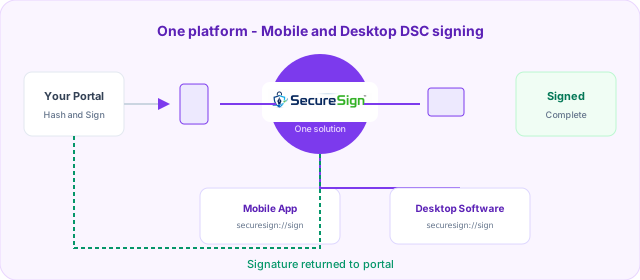
The simplest way to solve the core DSC signing problem — token access, certificate selection, PIN, and signature — on every device your users already have. No drivers in the browser. No complex setup.
SecureSign Mobile App
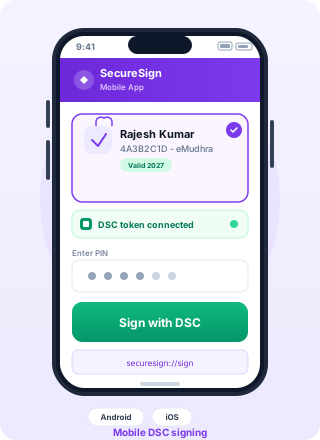
Android and iOS app for mobile browser and native app handoff. Your portal opens securesign://sign — the app handles token, certificate, and PIN.
SecureSign Desktop Software
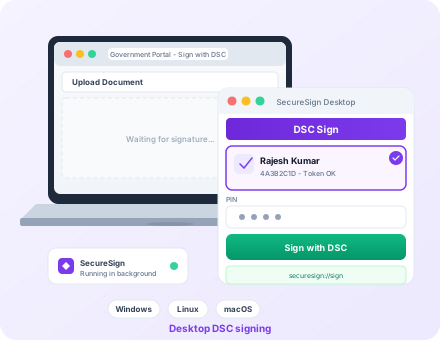
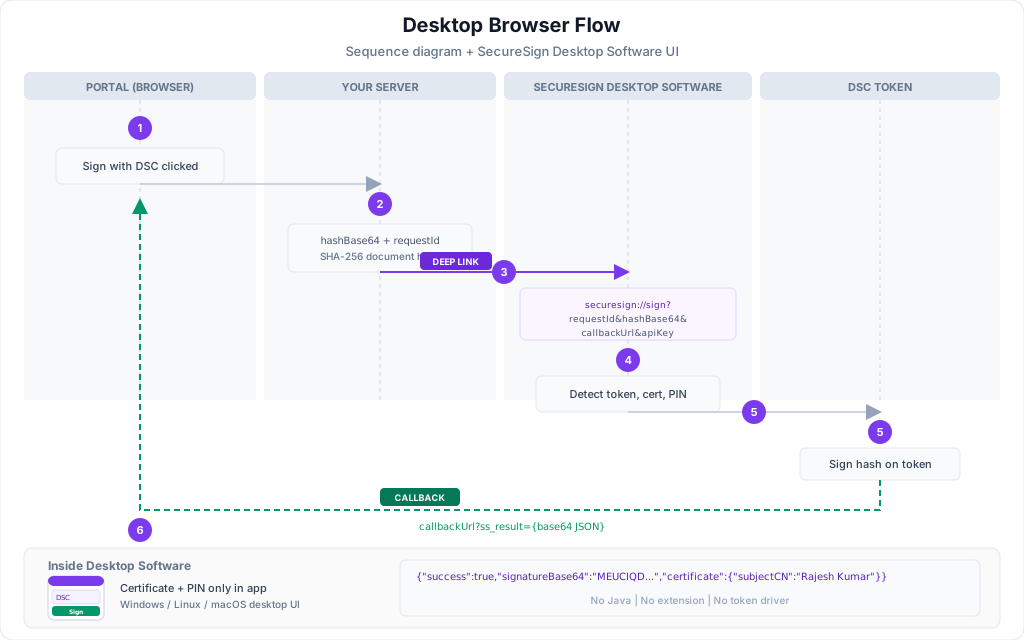
Background service for Windows, Linux, and macOS. Desktop browsers open securesign://sign — the same deep link as mobile — to launch Desktop Software and sign with the user's DSC token.
Integration at a glance
How it works
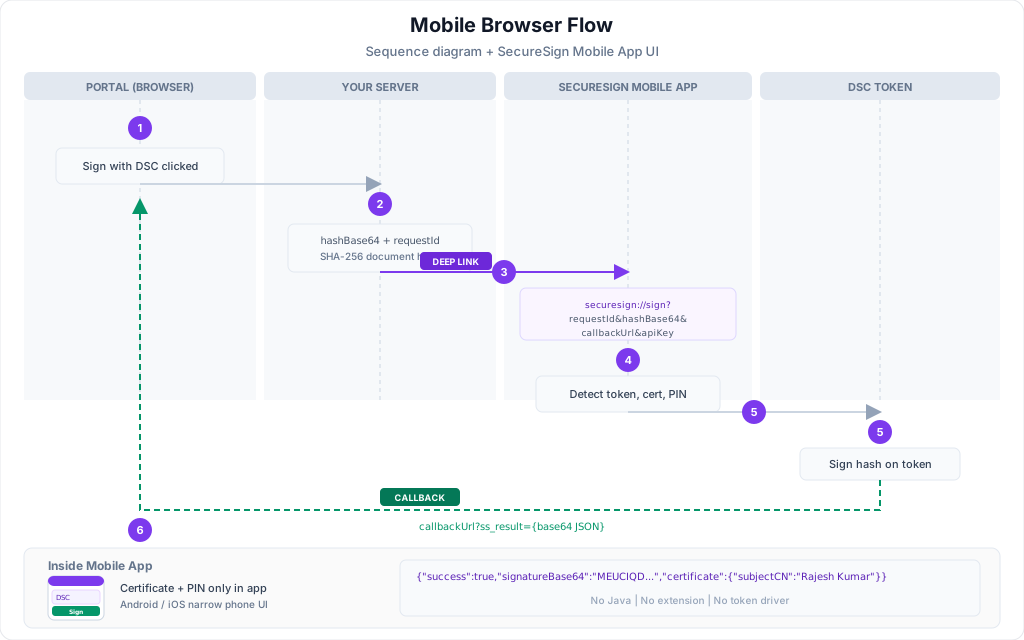
Your portal integrates once. SecureSign handles token access and signing on the user's device.
Portal integrates
Generate a document hash and invoke SecureSign via securesign://sign deep link with your API key.
User signs with DSC
SecureSign App or Desktop Software detects the token, shows certificates, and collects PIN securely.
Signature returns
Signed payload returns to your callback URL or browser JavaScript — upload completes on your portal.
What Makes Us Different
Traditional DSC signing depends on fragile browser plugins, vendor token drivers, and third-party extensions. SecureSign replaces that stack with one platform your users install once — and your portal integrates once.
0
Java applets or browser extensions
1
Integration for mobile & desktop
2
Products — App & Desktop Software
5
Platforms — Android to macOS
Token drivers, Java & extensions
What most portals still ask users to install and troubleshoot.
-
USB token drivers in the browser PKCS#11 and vendor-specific drivers that break after OS or browser updates.
-
Java applets & ActiveX Deprecated technology blocked by modern Chrome, Edge, Safari, and Firefox.
-
Third-party browser extensions emSigner-style add-ons that users must find, install, and keep updated per browser.
-
Constant error messages “Token not found,” “driver failed,” “extension not loaded” — support tickets and failed filings.
-
Mobile browsers left behind No reliable path for Android or iPhone users signing from a government or business portal.
-
IT-heavy setup per machine Different install steps for Windows, Linux, and macOS — repeated for every user and device.
One platform. Best-in-class DSC signing.
Signing runs in SecureSign App and Desktop Software — not inside the browser.
-
No token drivers on the web Your site never touches PKCS#11 or USB drivers. SecureSign handles token access on the device.
-
No Java, extensions, or emSigner Users install SecureSign once. No browser plugins or deprecated applets required.
-
Mobile and desktop, same portal Same deep link on every device —
securesign://signopens Mobile App or Desktop Software. -
Clear, guided signing UX Certificate pick, PIN entry, and errors handled in a dedicated app — not buried in browser dialogs.
-
Android, iOS, Windows, Linux & macOS One integration for your developers. Two products cover every environment your users need.
-
Protected signing core Private keys never leave the token. Signing logic stays inside SecureSign — not exposed in your web page.
SecureSign stands alone as the simplest path from “Sign with DSC” to a returned signature — without asking users to fight drivers, extensions, or outdated browser technology.
Why SecureSign
Built for government portals, compliance workflows, and enterprise signing at scale.
No token drivers on web
Mobile and desktop flows use SecureSign products — not browser extensions or Java applets.
One deep link everywhere
securesign://sign for mobile and desktop browsers on Windows, Linux, and macOS.
Government-ready
GST, MCA, GeM, eTender, and CCA-compliant workflows supported out of the box.
Protected signing core
Signing logic stays in SecureSign App and Software. Standard integrators never embed a public SDK.
SecureSign DSC SDK Functionality
Full device, certificate, signing, and verification capabilities — implemented in SecureSign Mobile App and Desktop Software.
Device & Token Management
- Detect DSC Token
- Detect Multiple Tokens
- Token Information
- Vendor Detection
- VID/PID Detection
- Token Health Check
- Token Connection Status
- USB Hot Plug Detection
- Token Removal Detection
- Supported Vendor Validation
Certificate Management
- Read Certificate
- Read All Certificates
- Certificate Selection
- View Certificate Details
- Certificate Chain Validation
- Certificate Expiry Check
- Certificate Revocation Check (CRL)
- OCSP Validation
- Export Public Certificate
- Certificate Search
- Certificate Alias Management
Authentication
- PIN Verification
- PIN Change
- PIN Retry Counter
- PIN Status Check
- Unlock Token (if supported)
- Biometric + PIN Workflow
- Session Authentication
- Auto Logout
- Multi-Factor Authentication
Digital Signing Core
- Sign Hash
- Verify Signature
- RSA Signing
- SHA256 Signing
- SHA384 Signing
- SHA512 Signing
- Detached Signature
- Attached Signature
- Batch Signing
- Bulk Signing
- Timestamp Support
PDF Signing
- PDF Sign
- Visible PDF Signature
- Invisible PDF Signature
- Multi-Page PDF Signing
- Multiple Signature Support
- PDF Signature Verification
- PDF Timestamping
- PDF Signature Position Selection
- Custom Signature Appearance
XML Signing
- XMLDSig Sign
- XMLDSig Verify
- Enveloped Signature
- Enveloping Signature
- Detached XML Signature
- XML Validation
- XML Certificate Extraction
Document Signing
- DOCX Signing
- P7S Generation
- CMS Signing
- PKCS#7 Signing
- File Hash Signing
- Custom File Signing
Signature Customization
- Signature Image
- Company Logo
- Signer Name
- Designation
- Date & Time
- QR Code
- Certificate Serial
- Custom Text
- Custom Stamp
- Custom Appearance Templates
Verification Engine
- Verify PDF Signature
- Verify XML Signature
- Verify PKCS#7 Signature
- Verify Certificate Chain
- Verify Timestamp
- Verify Revocation Status
- Document Integrity Check
- Tamper Detection
Compliance & trust
CCA / CCLA-aligned digital signing
SecureSign is built so compliance with applicable Controller of Certifying Authorities (CCA/CCLA) guidelines, standards, and security requirements governing the use of Digital Signatures is properly maintained across Mobile App and Desktop Software.
- Certificate chains validated against CCA India root CAs
- CRL and OCSP revocation checks before and after signing
- PKCS#11 token access with PIN protected in SecureSign products only
- Audit logging for government and enterprise compliance reporting
- Workflows aligned with GST, MCA, GeM, eTender, and public sector portals




Ready to integrate?
Get your API key, whitelist your domain, and follow the quickstart guide. Most portals are live in a single sprint.